Your school library desk, without the paper slips.
Catalogue every copy, issue and return books in seconds, and see who has what. Students borrow with a finger on the reader or a scan of their library card.
Part of DigiSchool: your students, classes and teachers are already here.
Everything that happens at the library desk
Built with Kenyan secondary schools running 8-4-4 forms and CBC grades side by side.
Catalogue and copies
Every title, every copy, with its accession number, shelf and condition.
Issue and returns
Due dates set from your rules. Renewals, reservations and damaged or lost copies handled.
Overdue books and fines
See what is late and who has it. Fines, replacement charges, payments and waivers in one place.
Every kind of borrower
Students, teachers, offices and staff, plus former students who still hold books.
Reports
Circulation, stock, popular titles and each borrower's history, ready for the end of term.
Roles and permissions
Decide who can issue books, waive fines or change settings.
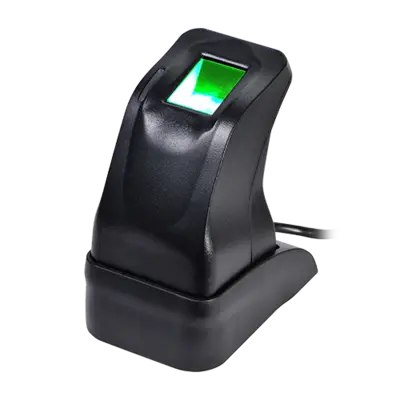
A finger is all a student needs
Plug a ZKTeco fingerprint reader into the library PC. The DigiSchool Agent links it to your library, and the librarian's screen follows every scan as it happens.
- Starting the readerKeep your finger off for a second.
- Place your finger on the reader nowThe reader blinks red while it waits.
- Borrower selectedTheir open loans and limits appear, ready to issue or return.
Enrol in three presses. Students, teachers and staff can all borrow by finger.
Keep the fingerprints you already have. Enrolments from a previous ZKTeco-based library system can be imported.
Kept private. Fingerprint data is encrypted and only ever sent to your own library PC.
Works with the ZKTeco ZK4500 USB reader on a Windows PC. Reader photo: ZKTeco.
Scan the card, scan the book, done
Any USB barcode scanner works. Print labels for your shelves and library cards for your students straight from DigiSchool.
Book labels carry each copy's accession number, so labels from your old system still scan.
Library cards carry the admission or staff number, printed ten to an A4 sheet.
No mouse needed. After each scan the cursor moves to the next step.
Moving from another library system?
We bring your records across so the library keeps running the day you switch.
The whole catalogueTitles, categories and every copy with its accession number.
Books still on loanMatched to today's students and teachers, so nothing goes missing.
Former studentsKept as alumni with the books they still owe.
Enrolled fingerprintsStudents already enrolled keep borrowing by finger.
How a loan works
Catalogue the copy
Add the book once. Each copy gets an accession number and a barcode label.
Identify the borrower
A finger on the reader, a scan of their card, or a quick search by name.
Scan the book
Confirm, and the due date is set from your loan rules.
Return and settle
Scan it back in. Late or damaged books raise the right charge.
Run your library desk from DigiSchool
Sign in with your DigiSchool account. Accounts are created by your school administrator.